- English
- 简体中文
- Esperanto
- Afrikaans
- Català
- שפה עברית
- Cymraeg
- Galego
- 繁体中文
- Latviešu
- icelandic
- ייִדיש
- беларускі
- Hrvatski
- Kreyòl ayisyen
- Shqiptar
- Malti
- lugha ya Kiswahili
- አማርኛ
- Bosanski
- Frysk
- ភាសាខ្មែរ
- ქართული
- ગુજરાતી
- Hausa
- Кыргыз тили
- ಕನ್ನಡ
- Corsa
- Kurdî
- മലയാളം
- Maori
- Монгол хэл
- Hmong
- IsiXhosa
- Zulu
- Punjabi
- پښتو
- Chichewa
- Samoa
- Sesotho
- සිංහල
- Gàidhlig
- Cebuano
- Somali
- Тоҷикӣ
- O'zbek
- Hawaiian
- سنڌي
- Shinra
- Հայերեն
- Igbo
- Sundanese
- Lëtzebuergesch
- Malagasy
- Yoruba
- Español
- Português
- русский
- Français
- 日本語
- Deutsch
- tiếng Việt
- Italiano
- Nederlands
- ภาษาไทย
- Polski
- 한국어
- Svenska
- magyar
- Malay
- বাংলা ভাষার
- Dansk
- Suomi
- हिन्दी
- Pilipino
- Türkçe
- Gaeilge
- العربية
- Indonesia
- Norsk
- تمل
- český
- ελληνικά
- український
- Javanese
- فارسی
- தமிழ்
- తెలుగు
- नेपाली
- Burmese
- български
- ລາວ
- Latine
- Қазақша
- Euskal
- Azərbaycan
- Slovenský jazyk
- Македонски
- Lietuvos
- Eesti Keel
- Română
- Slovenski
- मराठी
- Srpski језик

Yuav Ua Li Cas Ib Lub Xov Tooj Txuas Txuas Txhim Kho Koj Lub Neej Txhua Hnub?
Cov ntsiab lus: Mobile xov tooj bracketstau dhau los ua cov khoom siv tseem ceeb rau txhua tus neeg nrhiav kev yooj yim, kev nyab xeeb, thiab kev tsim khoom hauv txhua hnub. Phau ntawv qhia no tshawb txog cov txiaj ntsig tseem ceeb, hom, thiab cov lus qhia xaiv los pab koj xaiv lub xov tooj txawb zoo tshaj plaws rau kev siv hauv tsev, chaw ua haujlwm, lossis kev mus ncig.
Cov Lus Qhia
- Cov txiaj ntsig ntawm kev siv lub xov tooj txawb Bracket
- Hom Txawb Xov Tooj Brackets
- Lub tswv yim rau xaiv txoj cai txawb xov tooj bracket
- BOHONG Txawb Xov Tooj Bracket Nta
- Cov lus nug nquag
- Xaus
Cov txiaj ntsig ntawm kev siv lub xov tooj txawb Bracket
Cov xov tooj ntawm tes tsis yog cov cuab yeej yooj yim xwb - lawv txhim kho lub neej txhua hnub hauv ntau txoj hauv kev. Hauv qab no yog cov txiaj ntsig tseem ceeb:
- Kev Ua Haujlwm Tsis Muaj Tes:Zoo tagnrho rau kev hu video, streaming, lossis saib cov lus qhia yam tsis tau tuav koj lub xov tooj.
- Txhim kho kev nyab xeeb:Hauv tsheb, lub xov tooj ntawm tes tuav kom ruaj ntseg navigation thiab txo kev cuam tshuam.
- Enhanced Productivity:Zoo meej rau kev ua haujlwm ntau ntawm cov rooj lossis chav ua noj thaum khaws koj lub xov tooj saib.
- Versatility:Yuav siv tau rau hauv chaw ua haujlwm, chav pw, chav ua noj, lossis tsheb.
- Kev ruaj ntseg thiab kev tiv thaiv:Tiv thaiv kom tsis txhob ntog thiab tej zaum yuav puas tsuaj rau koj lub cuab yeej.
Hom Txawb Xov Tooj Brackets
Nkag siab txog ntau yam ntawm cov xov tooj ntawm tes yuav pab xaiv qhov zoo tshaj plaws rau koj cov kev xav tau:
| Hom | Kev piav qhia | Kev siv zoo tshaj plaws |
|---|---|---|
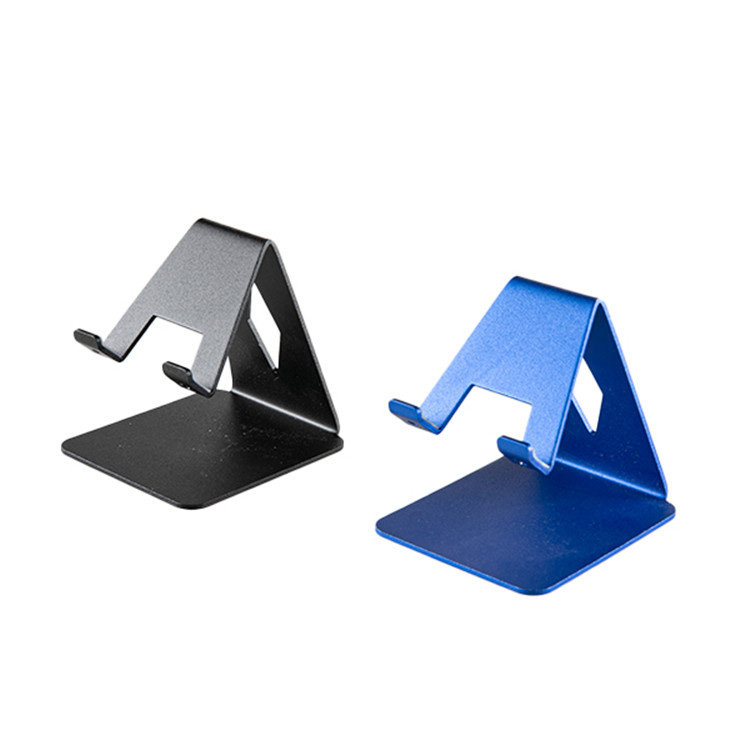
| Desk Stand Bracket | Tuav lub xov tooj upright ntawm lub rooj los yog lub rooj, feem ntau adjustable lub kaum sab xis. | Tsev, chaw ua haujlwm, chaw kawm |
| Tsheb Mount Bracket | Txuas rau lub tsheb dashboard, lub qhov cua, los yog cua qhov cua rau navigation. | Tsav tsheb, GPS navigation |
| Flexible / Gooseneck Bracket | Bendable caj npab tso cai rau qhov tseeb. | Lub txaj, chav ua noj, kaw cov yeeb yaj kiab |
| Tripod / Portable Bracket | Compact, lub teeb yuag bracket rau kev mus ncig thiab kev yees duab. | Vlogging, siv sab nraum zoov |
Lub tswv yim rau xaiv txoj cai txawb xov tooj bracket
Thaum xaiv ib lub xov tooj ntawm tes, xav txog cov hauv qab no:
- Compatibility:Xyuas kom lub bracket haum koj lub xov tooj qauv thiab qhov loj me.
- Adjustability:Nrhiav cov ces kaum hloov tau thiab qhov siab xaiv.
- Kev ruaj ntseg:Tshawb xyuas cov hauv paus los tiv thaiv plam lossis clamps kom ruaj ntseg qhov chaw.
- Khoom Zoo:Cov khoom siv ruaj khov xws li txhuas lossis cov yas yas siv tau ntev dua.
- Portability:Foldable los yog lub teeb yuag xaiv yog qhov zoo tagnrho rau kev mus ncig.
BOHONG Txawb Xov Tooj Bracket Nta
BOHONG muab cov xov tooj txawb xov tooj zoo tshaj plaws tsim los rau ntau yam, ua haujlwm ntev, thiab siv tau yooj yim. Cov yam ntxwv tseem ceeb muaj xws li:
- Universal compatibility nrog feem ntau smartphones thiab ntsiav tshuaj
- 360-degree rotation rau saj zawg zog saib cov ces kaum
- Sturdy clamp thiab anti-slip silicone pads rau qhov chaw ruaj ntseg
- Foldable thiab lub teeb yuag tsim rau portability
- Elegant tiav haum rau tsev, chaw ua haujlwm, thiab mus ncig
Cov yam ntxwv no uaBOHONGmobile xov tooj brackets ib tug tswv yim daws rau txhua txhua hnub yooj yim thiab productivity. Yog xav paub ntxiv specifications, mus saibBOHONG Mobile Xov tooj Bracket.
Cov lus nug nquag
-
Q: Lub bracket no puas tuaj yeem tuav cov smartphones lossis ntsiav tshuaj?
A: Yog, BOHONG brackets yog tsim los nrog adjustable clamps kom haum cov khoom ntawm ntau qhov ntau thiab tsawg, nrog rau cov xov tooj loj thiab cov ntsiav tshuaj me. -
Q: Nws puas muaj kev nyab xeeb siv lub bracket thaum tsav tsheb?
A: Yog lawm. Lub tsheb-mounted brackets ruaj ntseg tuav lub xov tooj nyob rau hauv qhov chaw, cia txhais tes-dawb navigation thiab txhim kho kev nyab xeeb. -
Q: Kuv puas tuaj yeem siv nws rau kev kaw video lossis streaming?
A: Yog. Flexible lossis tripod-style brackets yog qhov zoo tshaj plaws rau kev tsim cov kaw lus ruaj khov lossis cov ntsiab lus streaming yam tsis tuav lub cuab yeej.
Xaus
Cov xov tooj ntawm tes yog cov khoom siv yooj yim tab sis tseem ceeb uas txhim kho lub neej txhua hnub los ntawm kev muab kev yooj yim, kev nyab xeeb, thiab kev ua haujlwm zoo. Txawm nyob hauv tsev, chaw ua haujlwm, lossis mus ncig, xaiv txoj hlua khi kom ruaj khov thiab tsis muaj tes. BOHONG muaj cov khoom zoo, ntau yam khoom siv rau txhua qhov chaw. Txhim kho koj txoj haujlwm niaj hnub nrog BOHONG xov tooj ntawm tes niaj hnub no thiab paub txog cov txiaj ntsig ua ntej.
Npaj txhij los txhim kho koj cov kev paub hauv xov tooj?Tiv tauj pebkom tau txais koj lub xov tooj ntawm tes BOHONG tam sim no!
Xa lus nug


X
Peb siv cov ncuav qab zib los muab koj cov kev tshawb fawb zoo dua, txheeb xyuas qhov chaw khiav tsheb thiab kho cov ntsiab lus tus kheej. Los ntawm kev siv lub xaib no, koj pom zoo rau peb siv cov ncuav qab zib.
Txoj Cai Tswjfwm Ntiag Tug